



Secure remote access has become harder to manage as teams spread across countries and rely on contractors, agencies, freelance specialists, and remote connections into shared tools.
A single employee may use 10 or more tools each day. Freelancers often need access to many of those same systems.
The problem is that employee access usually follows a process. Freelancer access often doesn’t.
This poses a real risk because access gaps are easy to overlook until something goes wrong. Dormant accounts, excessive permissions, and forgotten contractor logins can:
- Create compliance issues
- Expose sensitive data
- Disrupt operations
This guide explains how to build a role-based access framework. You’ll learn how distributed team leaders, agency operators, and internal stakeholders can:
- Assign permissions
- Manage onboarding and offboarding
- Reduce access risks across distributed teams
Highlights
- Freelancer and contractor access is one of the most overlooked security risks for distributed teams. Verizon’s 2025 research found that 30% of data breaches involved a third party — up from roughly 15% the prior year — largely because contractor accounts are created informally and rarely go through the same onboarding controls as employees.
- A role-based access framework assigns permissions based on job function, not individual requests, which reduces the risk of over-privileged accounts. The framework covers five key areas: role classification, access tiers, provisioning workflows, offboarding processes, and regular audit schedules.
- Access tiers help organizations match permissions to actual responsibilities — Tier 1 for general operational tools, Tier 2 for department-level systems, and Tier 3 for sensitive administrative or financial platforms. Granting access beyond what a role requires creates security debt that compounds when permissions are never reviewed or removed.
- Offboarding deserves as much process rigor as onboarding, because dormant accounts left active after a contract ends are a primary source of unauthorized access. Offboarding triggers — tied to project completion, contract expiration, or inactivity thresholds — should be defined before work begins, not after it ends.
- Regular access audits catch outdated permissions before they create compliance or security issues, with high-risk systems reviewed quarterly and standard business tools reviewed every six months. IBM’s 2025 Cost of a Data Breach Report found the average breach now costs $4.4 million globally, making proactive access governance a financially material priority.
Why freelancer access is a major remote security blind spot
Most companies know who their employees are and what systems they use. Freelancer access is often less visible. In 2025, Verizon research found that 30% of breaches involved a third party, up from about 15% the year before. This shows how outside access can create security gaps.

Employees follow processes; freelancers often don’t
Most employees go through a formal onboarding process. HR, IT, and managers know when access starts and ends.
Freelancers often enter through a manager’s request. A content writer may receive access to a CMS tool and Slack channel without any central review or approval process.
The hidden risks of unmanaged contractor accounts
Unmanaged accounts create security gaps. A former designer may still have access to a digital asset library months after a contract ends.
Take these into consideration:
- Forgotten contractor logins
- Excessive permissions
- Shared credentials
- Dormant accounts
These increase the chance of unauthorized access to business systems.
The financial impact can be serious, too. According to IBM’s Cost of a Data Breach Report, the average cost of a data breach reached $4.4 million worldwide in 2025.
Why distributed team leaders should care about access governance
Access governance isn’t only an IT concern. It affects compliance, data protection, and business continuity.
Say a former consultant keeps access to HR records or payroll systems. The result? The organization may face audit issues, privacy concerns, and operational disruption.
A role-based secure remote access framework for employees and freelancers
The safest access model starts with roles. Instead of deciding permissions one person at a time, teams define access based on job responsibilities.
Role-based controls address authorization, but they are only one part of a secure remote access solution. Organizations still need authentication, secure connections, endpoint visibility, and monitoring to protect access from outside the office.
Within that broader security model, this role-based framework comprises five parts:
- Role classification
- Access tiers
- Provisioning workflows
- Offboarding processes
- Audit schedules
Together, they create a clear process that works for employees, freelancers, and contractors.
This framework does not replace technical controls like VPNs, ZTNA, authentication, or endpoint monitoring. It gives those controls a cleaner operating model by defining who should receive access, what they should reach, and when that access should end.
Step 1: Categorize users by role and business function
Before granting access, identify each person’s role within the organization.
Internal employees
Employees often need access across multiple business systems. The requirements for an HR manager differ significantly from those of a software engineer.
Each role supports different business functions and needs different levels of access.
External contractors and freelancers
Contractors usually need narrower access than employees. Their permissions should match the work outlined in their engagement.
A freelance designer, for example, may need design tools and project software, but not HR or financial systems.
Define access requirements before granting permissions
Start with the work, then determine the access required to complete it. List the tools, systems, and data each role needs.
For example, a content writer may need AI writing tools or a project management platform. Avoid granting extra access for convenience or potential future tasks.
Step 2: Create access tiers for every role
Not every user needs the same level of network access. Access tiers help teams grant permissions based on responsibilities rather than individual requests.
Tier 1: Basic operational access
Tier 1 covers the tools most people need to do their day-to-day work.
For example, a content manager may need Zoom, email, and other internal communication tools like Slack.
Tier 2: Department-level access
Tier 2 includes systems used by specific departments to perform their work.
Take a marketing manager, for example. They may need access to CRM platforms, marketing automation software, and reporting tools. An HR employee may need access to HR systems.
Tier 3: Sensitive business and administrative access
Tier 3 should be reserved for users who need access to sensitive systems, firewall settings, administrative controls, or the corporate network.
An IT administrator may need access to security settings and administrative controls. Similarly, a finance leader may require access to financial systems and customer databases.
Prevent over-privileged access before it becomes a risk
One of the most common problems is the over-privileged user. This can be an employee or freelancer who receives broad access for a single task and never has those permissions removed.
The risk grows when teams manage large database environments. In those cases, visibility into who can access specific systems becomes essential.
Organizations that use enterprise cloud infrastructure often rely on Oracle managed services to handle patching, configuration, and database monitoring. This helps enforce role-based access policies at the data layer without adding more work for internal IT teams.
When oversight remains in place, teams avoid the security debt that can accumulate when people bypass standard access procedures to meet deadlines.


Example role-to-access matrix
The table below shows how access tiers can align with common roles. The exact tools will vary between organizations, but the principle stays the same: grant access based on job requirements, not convenience.
| Role | Access tier | Typical tools |
| Content writer | Tier 1 | CMS, Slack, project management |
| Designer | Tier 1–2 | Design software, DAM, project management |
| Marketing manager | Tier 2 | Analytics, CRM, marketing platforms |
| HR manager | Tier 2–3 | HRIS, payroll systems |
| IT administrator | Tier 3 | Identity management, admin consoles |
Step 3: Standardize provisioning and approval workflows
Access requests should follow the same process every time.
Create a documented access request process
Every access request should answer three questions before approval:
- Who is requesting access?
- Which systems are needed?
- Why is the access required?
For example, if a consultant needs CRM access, the request should identify the tool, business purpose, and approver before access is granted.
Assign ownership for every account
Every account should have a named owner. This could be a manager, department lead, or system owner.
For example, if a freelance designer receives access to a digital asset platform, someone inside the organization should remain responsible for reviewing and managing that account.
Automate provisioning where possible
Automation helps create a consistent onboarding experience for employees and contractors.

For example, a junior marketer can receive access to content analytics tools like SurferSEO through a predefined workflow. This reduces manual errors and speeds up account setup.
Step 4: Build secure offboarding into every engagement
Access management doesn’t end when someone receives access. It should also include a clear plan to remove that access when the work concludes.
Why access removal deserves as much attention as onboarding
Many organizations spend time approving access but far less time removing it. That is where gaps start to appear.
A freelancer may finish a project, yet their accounts stay active. Permissions remain in place because no one owns the offboarding process or confirms that access was removed.
Freelancer offboarding checklist
A consistent checklist helps prevent access from slipping through the cracks. For example, when a consultant reaches the end of a contract, the organization should:
- Document completion of all offboarding tasks
- Rotate shared credentials where necessary
- Revoke third-party integrations
- Remove group memberships
- Disable accounts
These steps help ensure that access ends when the engagement ends.
Create offboarding triggers before work begins
Offboarding shouldn’t depend on someone remembering to submit a request. The trigger should be defined before work starts.
For instance, access can be removed when a project is completed, a contract expires, or an account reaches a set inactivity threshold. Clear triggers create a more consistent offboarding process.
Step 5: Schedule regular access audits and reviews
Access needs change over time. Regular reviews help organizations catch outdated permissions before they create security, compliance, or operational issues.
Quarterly reviews for high-risk systems
Some systems require closer oversight because they contain sensitive information or rely on administrative controls.
For instance, a quarterly review can provide a practical starting point for admin platforms, financial software, and customer databases, with the final schedule based on risk and compliance requirements. This allows them to identify unnecessary or outdated permissions.
Biannual reviews for standard business tools
Not every system requires the same review schedule. For lower-risk business tools, a biannual review may be sufficient, depending on account turnover and data sensitivity.
For example, companies can assess access to communication platforms, content collaboration tools, marketing software, and productivity applications every six months.
Questions every access review should answer
Every review should focus on a small set of practical questions. The goal is to confirm that access still serves a business purpose.
For example:
- Is there a documented owner responsible for that account?
- Are the permissions still appropriate?
- Does the user still need access?
- Is the account active?
Look beyond access reviews and monitor data exposure
Access reviews show who can enter a system. They don’t show how data moves once someone is inside.
That is where data security posture management (DSPM) adds another layer of protection. It tracks how data is accessed, shared, and exposed across systems. This becomes important in distributed teams where tools, roles, and permissions change over time.

For example, a user may have approved access but still expose sensitive information through an overlooked workflow or integration. Continuous monitoring helps uncover weak points that static access policies may miss. This is especially important when access is distributed across employees, freelancers, and external tools.
Use activity insights to refine permissions
Access frameworks define who can use a tool. They don’t reveal whether that access is being used in a meaningful way.
Productivity management software helps fill that gap. It provides visibility into how people use the tools they’ve been given. For example, a contractor may have access to six platforms but spend almost all of their time in only two.
Usage data should support access reviews rather than determine them. Some tools may be used infrequently but still be required for specific responsibilities or periodic tasks.
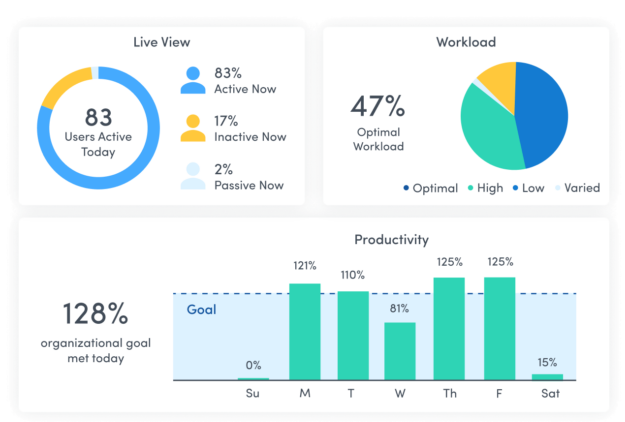
Usage data can help organizations refine permissions based on how work actually happens. This keeps secure remote access aligned with real responsibilities while reducing unnecessary tools, excess access, and workflow complexity.
Combine role-based access with threat detection
Role-based access environments, where employees and freelancers authenticate before receiving access only to the tools they need, reduce the attack surface. However, they shouldn’t be the only line of defense.
Threat detection tools help monitor activity after access has been granted. For example, they can flag:
- An attempt to reach a restricted resource
- An unexpected login location
- Unusual data transfer activity

This visibility helps teams identify potential threats sooner and respond before a small issue becomes a larger security incident.
A secure remote access template distributed teams can use
A written policy helps turn access governance from a one-time project into an ongoing process. The goal is to create clear rules that everyone follows.
Core elements every policy should include
Every access policy should define who receives access, how approvals work, and when permissions are reviewed.
For example, the policy should include:
- Offboarding requirements
- Approval requirements
- Review schedules
- Role definitions
- Access tiers
These elements create consistency across employees, contractors, and freelancers.
Responsibilities across HR, managers, and IT
Access governance works best when responsibilities are clear from the start.
For example:
- HR can track employment and contract status
- Managers can approve business access needs
- IT can provision, review, and remove access
Clear ownership helps prevent requests and accounts from falling through the cracks.
Secure remote access starts with stronger access governance
Secure remote access isn’t just a technology issue. In many organizations, the bigger challenge is controlling who receives access, how permissions are reviewed, and when that access is removed.
For many distributed teams, unmanaged freelancer and contractor accounts can present a significant risk. A role-based framework creates consistency, clear ownership, and a process that can grow with the business.
When was the last time your organization reviewed its access controls? A simple review can uncover dormant accounts, excessive permissions, and process gaps before they create larger problems. If you’d like to continue the conversation, get in touch with our team.
FAQs
What is role-based access control?
Role-based access control assigns permissions based on a user’s job function. It helps businesses limit access to only the tools and data required for that role.
How often should access permissions be reviewed?
Review high-risk systems quarterly and standard business tools every six months to identify inactive accounts, outdated permissions, and unnecessary access.
Why is freelancer access considered a security risk?
Freelancers often receive access through informal processes. Without proper reviews and offboarding, accounts can remain active long after the work has ended.