



Keeping a service team productive requires more than handing out daily job sheets. You need a system that improves the overall customer experience, connects the field to the back office, and stops revenue leaks.
Finding the right field service management software determines whether your business scales smoothly or chokes on administrative bottlenecks.
This guide breaks down the core features of modern platforms. It helps you bypass confusing marketing claims to select the tool that matches your operational reality. You’ll leave with a clear framework to evaluate software vendors, plan your implementation budget, and ensure your team adopts the new system right out of the gate.
Highlights
- Field service management (FSM) principles apply broadly across multiple industries, requiring adaptable tracking and coordination tools
- Financial planning helps you choose the platform that addresses your operational problems, rather than settling for the cheapest option
- Core functionality, such as scheduling and dispatching, must take precedence over secondary dashboard features
- Mobile applications strongly influence technician adoption and field-data quality
What is field service management software?
Field service management (FSM) is the logistical coordination of mobile teams, equipment, and physical service tasks performed outside company walls. FSM software is the digital engine that runs this operation.
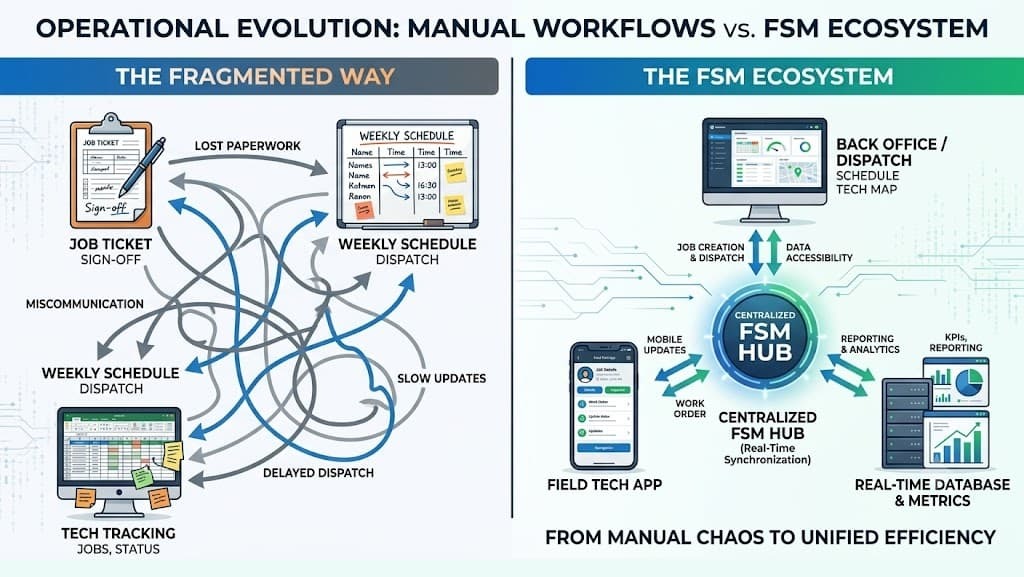
(Image created by author)
From manual chaos to unified efficiency
Teams traditionally managed FSM with:
- Spreadsheets
- Paper tickets
- Whiteboards
- Punch cards
Field service management software replaces these manual processes with a centralized platform that handles:
- Scheduling and dispatching
- Work order management
- Inventory management
- Billing and reporting
- And more
It links the back office directly to the technician’s mobile device in real time.
Understanding the scope of modern field service management software
Enterprise-grade field service platforms have evolved far beyond basic digital calendars and simple routing tools. Today, these systems function as operational hubs that track and manage every step of the service lifecycle.
For example, modern platforms integrate a computerized maintenance management system (CMMS) with field service automation tools. This integration allows your organization to operate from a single source of truth. Consequently:
- Field technicians receive precise job requirements in near real time
- Office teams get live updates on job progress and incoming alerts
- Stakeholders benefit from instant documentation and reporting
- Dispatchers see live technician locations
- Managers track job costing margins
The best platforms handle this complexity without overwhelming users. They translate chaotic incoming requests into organized, actionable workflows. This foundation allows growing companies to manage more work orders without constantly hiring additional administrative staff.
Expanding beyond traditional trades
FSM platforms traditionally served construction, HVAC, and electrical contracting businesses. However, maintaining strict service-level agreements (SLAs) requires precise coordination across many other industries. Complex service requirements are pushing this technology into diverse new sectors, such as renewables, property management, and even healthcare. For example, remote patient monitoring companies often depend on smooth:
- Follow-up workflows
- Device deployment
- Troubleshooting
- Maintenance
- Patient setup
- And more

(Image created by author)
Hypothetical FSM platform for healthcare
It’s the perfect context for FSM software. For buyers evaluating these platforms, healthcare field service is a useful example of why scheduling, documentation, technician visibility, and issue resolution need to work together when service delivery happens outside a traditional office or clinic.
Evaluating tools through this broader lens reveals the true flexibility of top-tier platforms. Let’s look at the key features to look for.
Core operations: Scheduling, dispatching, and AI integration
When evaluating an FSM platform, prioritize core capabilities that directly eliminate manual operational bottlenecks. A robust FSM suite bridges office administration with field operations. This means your platform should integrate field scheduling and dispatch optimization.
Sudden cancellations, emergency calls, and delayed jobs happen daily in the real world. Your software must recalculate the daily board instantly to prevent costly downtime.
Top-tier platforms also integrate specialized quoting software modules that enable technicians to generate accurate, multi-tier price estimates on-site in real time for immediate client sign-off.
Resource allocation and route optimization
Proper resource allocation prevents you from sending an apprentice to a job that requires a master technician’s license. Accurate time-tracking features then feed into this scheduling engine, creating realistic windows for job completion based on historical data.
Just as importantly, reducing transit time represents one of the easiest ways to recover lost revenue. Route optimization software maps the most efficient paths between jobs, adapting to traffic patterns and proximity requirements. In one Salesforce customer example, smarter scheduling and route optimization reduced field service travel time by 30%.

(Image created by author)
Route optimization functionality
Slashing daily drive time saves fuel and allows your dispatchers to fit an extra completed work order into every technician’s shift.
Leveraging AI for field services
Choosing field service management software has always required balancing scheduling complexity, technician productivity, and customer expectations. However, in 2026, there’s a fourth variable that separates the best platforms from the rest: how well the core workflow embeds AI for field services, not as an add-on, but as an active layer that:
- Closes the gap between the back office and the field in real time
- Predicts failures before they happen
- Dispatches smarter
During demos, ask vendors to show where AI changes a dispatcher or technician action. Useful AI should recommend a technician, surface a likely part, summarize a completed visit, or reduce manual documentation. Treat generic AI dashboards as secondary unless they reduce a measurable bottleneck in scheduling, diagnosis, reporting, or billing.
Salesforce reports that 79% of service organizations are investing in AI, while 83% of decision-makers plan to increase AI investment over the next year.

(Data source: Salesforce)
AI investment in the field service industry
In this sense, intelligent dispatching changes how modern service organizations manage their daily workforce. Predictive algorithms can now assess historical job data to recommend the optimal technician for a complex repair. This technology moves beyond basic proximity rules to analyze:
- Current traffic conditions
- Inventory on hand
- Success rates
Execution: Work order management, mobile apps, and real-time visibility
Transitioning a job from an accepted quote to an actively dispatched ticket demands clarity. Work order management features ensure that all job details, client notes, and equipment manuals are available to the technician at the job site. Dispatchers and operations managers must maintain real-time visibility into field progress without constantly interrupting field technicians with phone calls.
Connecting the field with a powerful mobile app
Your technicians must interact with the software entirely through their phones or tablets. Nobody wants to type on a laptop while they’re atop a steep roof. A powerful, user-friendly, lightweight app is a must-have feature.
Clunky interfaces lead to:
- Frontline worker frustration
- Poor reporting accuracy
- Poor data entry
The mobile app dictates your adoption rate. This makes it the most critical evaluation point during a vendor demo. Technicians need instant access to digital forms, checklists, and a field service report for technicians to ensure they follow standard operating procedures on every site while accurately documenting completed work.
Ensuring reliability through offline functionality
Fieldwork takes technicians into places where cellular signals die, including:
- Heavy industrial facilities
- Concrete basements
- Remote rural areas

(Image created by author)
Offline mode on an FSM app
Software that freezes without an internet connection cripples your team’s ability to complete their assigned tasks. Regardless of network availability, technicians must remain able to:
- Capture customer signatures
- Update job statuses
- Generate reports
- Access manuals
Offline functionality solves this common frustration by caching necessary job data locally on the technician’s device. Once the device reconnects to a cellular or Wi-Fi network, the platform syncs all offline actions back to the central database.
Managing resources: Inventory tracking and preventive/predictive maintenance
Tracking parts and equipment prevents job delays and frustrating return trips to the warehouse. These return visits can be expensive.
Tracking parts for a higher first-time fix rate
Asset tracking capabilities give managers clear visibility into warehouse stock levels and individual truck inventories. Knowing exactly what parts sit in each van ensures your dispatchers can assign the right person to the right emergency.
A missing fifty-cent valve can ruin a thousand-dollar service call. Poor inventory tracking forces technicians to leave job sites unfinished, irritating customers and wasting valuable scheduling time. Maintaining strict control over your parts supply chain ensures technicians arrive fully equipped to handle the diagnosed issue, leading to better first-time fix rates (FTFR).
According to Aquant’s 2025 Field Service Benchmark Report, first-time fix rates average 75% across all industries, ranging from 69% for medical devices to 82% for high tech and electronics.

(Data source: Aquant)
First-time fix rates (FTFR) by industry
The report also shows top performers reaching a 30-day FTFR of 86%. Their cost per work order is 23% lower than the median. Comparing your current FTFR with these benchmarks gives you an idea of the financial and operational impact the right FSM software can have.
Shifting from break-fix to condition-based maintenance
Proactive service models generate predictable, recurring revenue while smoothing out erratic scheduling spikes. FSM systems manage preventive maintenance contracts by automatically generating work orders based on time intervals or specific usage metrics. This approach shifts operations from reactive emergency calls to planned, more predictable service routes.
More advanced platforms support condition-based maintenance. This technology integrates with IoT sensors on deployed equipment. When an asset detects operating anomalies, the software automatically triggers a repair ticket before a catastrophic failure occurs. This robust asset lifecycle management keeps customer equipment running longer and positions your company as a trusted long-term service partner.
Efficiency multipliers: Workflow automation and financial lifecycles
Squeezing extra margin out of the daily schedule requires eliminating manual data entry across your organization. Automating routine tasks allows your back-office team to handle significantly more volume without adding administrative headcount.
Standardizing operations via workflow automation
Manual communication creates bottlenecks that slow down your entire service delivery pipeline. Workflow automation (e.g., AI agents, chatbots, etc.) solves this by executing predefined actions whenever a job status changes in the system. Automated triggers can:
- Update management dashboards instantly
- Alert warehouse staff to pick parts
- Send customer notifications
According to Salesforce research, mobile workers spend 32% of their time interacting with customers; the remaining 68% goes to tasks such as manually entering case notes. Reporting and analytics dashboards help leadership identify these bottlenecks, enabling teams to automate the underlying processes.
Streamlining the quote-to-cash cycle, invoicing, and CRM integration
Getting paid promptly requires tight integration between field data and your accounting software. The quote-to-cash cycle must flow logically from the initial estimate straight through to the final customer receipt. Capturing digital signatures and processing credit cards on-site can streamline this process by:
- Reducing accounts receivable aging
- Strengthening cash flow
Furthermore, a great field service platform never exists in a silo. CRM integration unifies your operational data with your sales and support history, maintaining a single source of truth. API-first integrations connect the platform with invoicing and payment systems. A dedicated customer portal lets clients review past work and pay open invoices online.
Businesses with specialized workflows or complex legacy systems may need custom software development service to connect dispatching, mobile operations, inventory, CRM, billing, and reporting within a unified platform.
Funding your software implementation
Upgrading your operational backbone requires capital for:
- Hardware upgrades
- Software licensing
- Employee training
- Data migration
- And more
Licensing costs vary by product and user type. For example, Microsoft currently prices Dynamics 365 Field Service at $105 per user per month and its Contractor plan at $50 per user per month, both paid yearly.

(Image source: Microsoft)
Dynamics 365 Field Service pricing
This makes choosing the right FSM software an investment. Like any business investment, timing matters. Many field service operators turn to quick business loans to cover these costs and implement the right platform without disrupting cash flow. This type of financing can help you through the transition period before the software starts paying for itself.
Getting the financing sorted early means you can make the right software decision, not just the most affordable one.
Pro tip:
Secure your implementation budget before beginning vendor demonstrations. It’ll enable you to maintain negotiating leverage. Proper funding ensures you don’t cut corners on essential features or compromise on necessary onboarding support.
Software that equips your team to scale without the stress
Adopting the right field service management platform eliminates administrative bottlenecks. It sets a firm foundation for scaling your operations. However, before shopping for software and making your choice, you must:
- Map out your specific workflows and document your most frustrating operational hurdles
- Secure financing for licenses, implementation, and onboarding costs
- Define the core must-have features
Involving your lead technicians in the testing phase helps confirm that the mobile application works as expected in real-world conditions.
Use this framework to navigate vendor demos confidently without getting distracted by unnecessary bells and whistles. Prioritizing core functionalities such as dispatching, offline mobile access, and integrated billing helps protect your profit margins.
Field service software can remove operational friction, but it does not create demand on its own. Once your team can handle more work, the next constraint is the pipeline: educating buyers, ranking for service-related searches, and turning operational expertise into content that drives qualified leads.
Codeless builds content operations and owned growth systems for teams that need a repeatable way to turn expertise into revenue. Explore Codeless to see how its growth systems work.
FAQs
What is field service management software?
FSM software serves as a digital platform for coordinating and optimizing mobile workforces. It connects field operations with back-office systems to eliminate paper processes and centralize company data. Modern platforms handle scheduling, route optimization, inventory management, and final customer billing within a unified environment.
How does GPS tracking improve customer satisfaction?
Real-time location tracking allows dispatchers to assign emergency work orders to the nearest available technician. This capability reduces travel time, lowers fuel costs, and minimizes customer wait times during critical equipment failures. Providing clients with accurate, live estimated arrival windows heavily boosts your overall customer satisfaction (CSAT) scores.
What features matter most in field service management software?
The most important features are scheduling, dispatching, work order management, mobile access, offline functionality, inventory tracking, invoicing, reporting, and integrations with CRM or accounting software.
How much does field service management software cost?
Costs vary by vendor, user type, implementation scope, integrations, training, and hardware needs. Buyers should compare total first-year cost instead of monthly license price alone.
What should buyers ask during an FSM software demo?
Ask vendors to show the exact workflows your team uses every day, including emergency dispatching, offline mobile updates, inventory checks, quote approval, invoicing, and reporting.